Send an editable snippet
- Create a pad and add code. You can also type directly into the homepage editor and choose share this pad.
- Choose the language. The language picker controls syntax highlighting. Add file tabs if the example needs more than one file.
- Open share and copy the edit link. A recipient who opens that URL can edit the pad. No account is required.
Use an edit link when a colleague should help fix a function, revise a SQL query, or write examples. The collaborative-editing guide walks through a JavaScript example.
Send a read-only link
- As the pad creator, open share and select read-only link.
- Copy the separate read-only URL and send that URL to your reader.
- Open it in another browser to check the saved files before sharing it more widely.
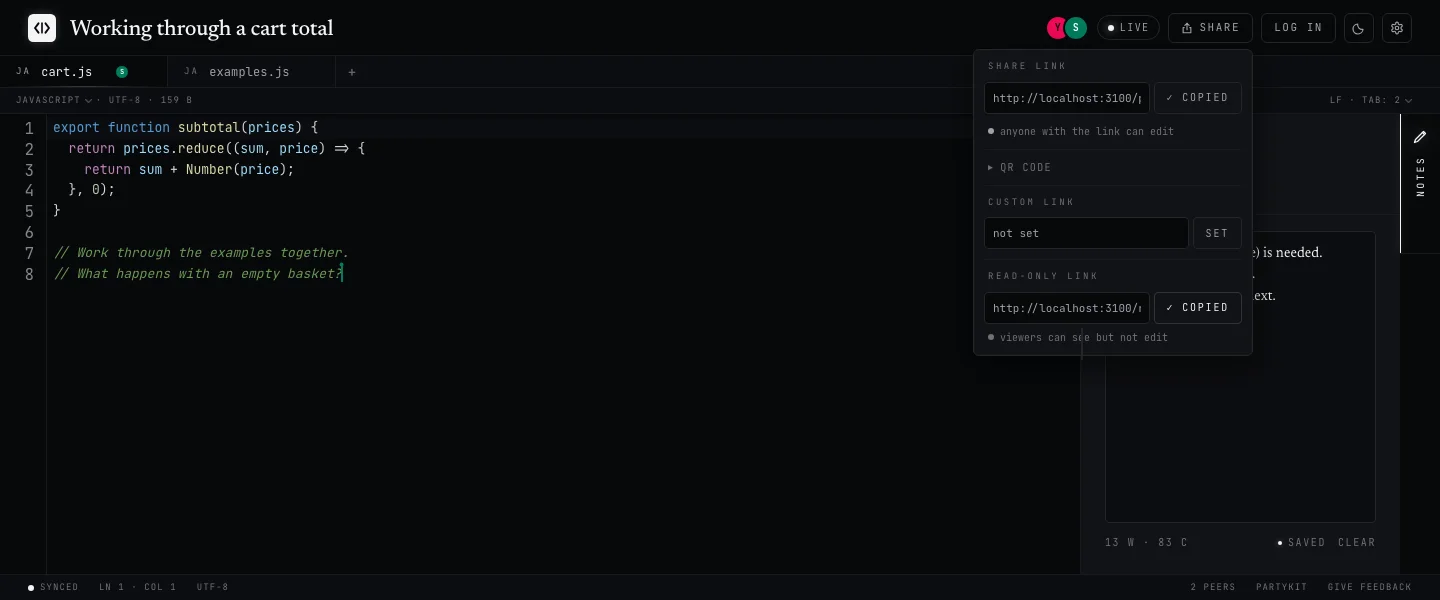
Read-only describes the reader’s permissions. It does not lock the original pad or freeze a permanent version. The read-only page loads the latest saved snapshot when opened or refreshed, so later edits may appear there too.
If you need a fixed version for a review, keep a separate copy in your own files or version control. The read-only view also offers a copy action.
Choose a link for the task
| Task | Use | What to expect |
|---|---|---|
| Work on a snippet together | Edit link | Anyone with the link can edit the shared files. |
| Let someone read or copy code | Read-only link | Readers see a saved version and cannot edit through that link. |
| Share during a presentation | QR code in the share menu | The QR code opens the edit link. Use it when audience editing is intended. |
| Show code inside another page | Embed URL | A read-only display of the first saved file. Your own page controls its size. |
Embed a snippet
Use the pad ID from an edit URL in the form /pad/PAD_ID. Replace PAD_ID in this example with that ID. It is different from an editable slug or read-only token.
<iframe
  src="https://codepad.pro/embed/PAD_ID"
  title="Code example"
  width="100%"
  height="360"
  loading="lazy"
></iframe>
Embeds show the first saved file without file tabs. Check that the intended snippet appears before publishing the containing page. Embedding code makes it available to that page’s visitors.
Understand what a link shares
Shared code is accessible to people who have its link. Private notes are separate and are not included in the edit link, read-only page, or embed. Keep credentials and other sensitive material out of shared snippets.
Owned pads and notes depend on your browser’s identity cookie. Read the storage and access information for the limits of anonymous access and saving.