Schedule a call.
Send a link.
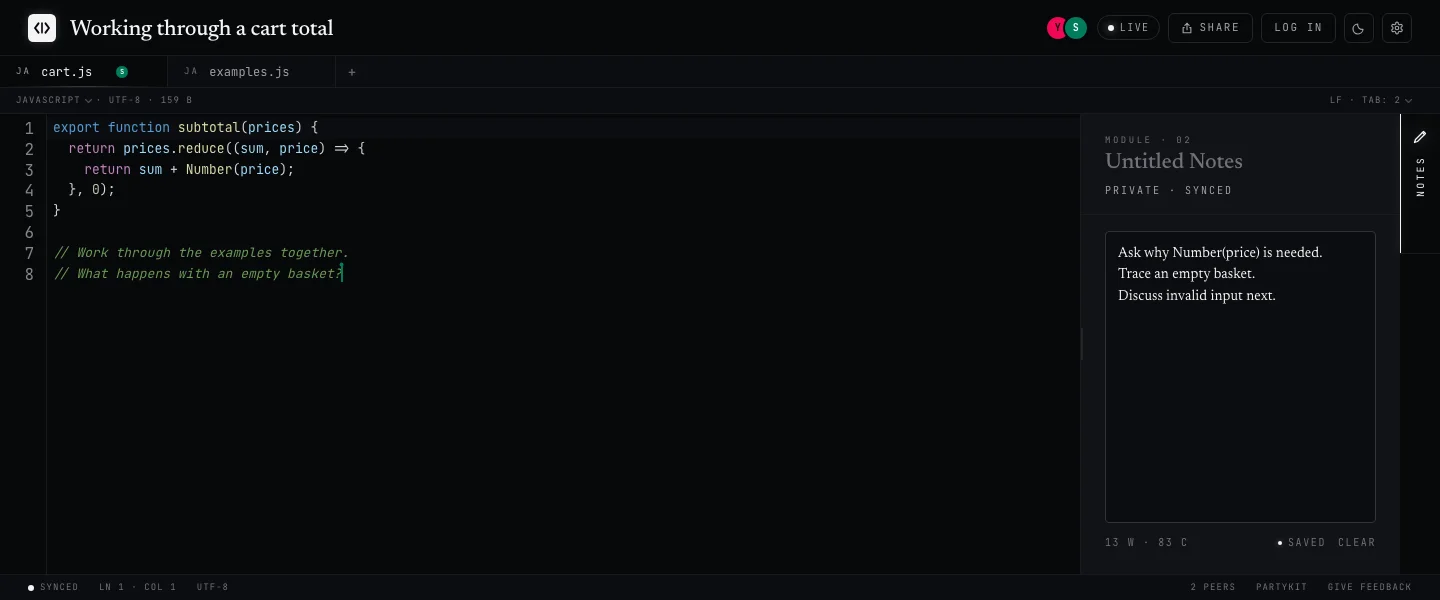
Codepad is a real-time collaborative code pad. Cursors sync like Google Docs. A shared timer runs mock interviews. And a private notes panel only you can see - perfect for jotting rubric scores while your candidate types.
2
3
4
5
6
7
8
9
10
11
12
# 2sum - candidate typing def two_sum(nums, target): seen = {} for i, n in enumerate(nums): need = target - n if need in seen: return [seen[need], i] seen[n] = i return []
06:12Key Features
Cursors like Google Docs, code like your editor.
Labeled carets, tinted selections, jump-to-peer - on top of a real CodeMirror buffer with 40+ language modes. Not a textarea in disguise.
See the comparison →Run mock interviews without a second tab.
A chronograph in the title bar. Pick 25 / 45 / 60 min. Starts for both of you - synced to the second, visible to both of you.
Set up a mock →Score them while they solve it.
Open the notes panel and jot anything - rubric, gotchas, follow-ups. It saves to your account only. Your candidate never sees it.
Share a snippet →The “Google Docs moment” - but for code.
Google Docs made “send me the link” the default for writing. Codepad does the same for a snippet, a scratch file, a take-home. Same ergonomics, right editor.
Google Doc · for code
- ✓Paste-to-share link
- ✓Cursors + selections sync
- ✗Syntax highlighting
- ✗Gutter, line numbers, tabs
- ✗Multiple files in one URL
- ✗Shared countdown timer
- ✗Private notes panel
A real editor behind the URL
- ✓Paste-to-share link
- ✓Cursors + selections sync
- ✓Syntax highlighting (40+ languages)
- ✓Gutter, line numbers, tabs per pad
- ✓Multiple files in one URL
- ✓Shared countdown timer
- ✓Private notes panel
A shared timer - for the conversation you’re already having.
Coding interviews are timed. Your pad should be too. Set 45 minutes from the title bar and both of you watch the same arc drain. No extra tab, no stopwatch on your phone, no “how long left?”
# candidate is typing… def two_sum(nums, target): seen = {} for i, n in enumerate(nums): need = target - n if need in seen: return [seen[need], i] seen[n] = i
One click. Both clocks start.
Presets for standard interview lengths. Pick one - your candidate sees the same arc in their title bar, drifting in lockstep.
Score from the notes panel.
Open the side panel, jot timestamps, rate trade-offs. Your notes save privately - visible only to you, right beside the code.
Two rooms, one pad.
Open the notes panel from the side rail and start typing. Everything you write saves privately to your account - your candidate sees the code, you see the rubric. Same pad, same URL, two different views.
# candidate is typing… def two_sum(nums, target): seen = {} for i, n in enumerate(nums): need = target - n if need in seen: return [seen[need], i] seen[n] = i return []
- ✓06:12 · asked about duplicates - good instinct
- ✓08:45 · brute-force first, called it out
- ✓11:30 · hashmap idea unprompted
- ·explaining O(n) now - watch for confusion about hash collisions
- ·follow-up if time: sorted input? → two pointers
Small stack. Real editor.
The boring-good parts. CodeMirror under the hood, yjs for sync, partykit on the edge, a theme for every light sensitivity.
Yjs CRDT sync
No conflicts, no lost edits - even when a peer drops offline mid-edit.
CodeMirror 6
Gutter, vim bindings, bracket matching. 40+ language modes.
No accounts
Pick a name once. Your pads travel on their URL - no sign-up, no OAuth wall, no “verify your email.”
Read-only snapshots
Flip any pad read-only with one click. Great for posting code in a design doc without a stranger deleting your SQL.
Midnight or paper
Dark default, light opt-in. No flash on load. Each peer picks their own - the doc stays in sync.
One click, one URL. No install, no signup.
Open a pad, send the link. Your collaborator joins from any browser, on any device. Faster than scheduling a call.
Not all codepads are the same.
There are other tools with similar names. Here’s what sets us apart - and we’re shipping new features every week.
codepad.org & friends
The original codepad runs code in ~12 languages and shows output. Great for 2008 - but no collaboration, no real-time, and no updates in years.
CoderPad, HackerRank & co.
Full interview suites with code execution, video, and analytics. Powerful - but they require accounts, paid plans, and heavyweight setup for a quick screen.
GitHub Gist, Pastebin & others
Quick and simple for sharing a snippet. But the moment you need real-time editing, a timer, or more than one file - you hit a wall. Static pastes, not live pads.
Common questions.
Everything most people ask before they hit “new pad.”
Do I need an account to use Codepad?
No. Click "+ new pad" and you get a shareable URL instantly. Your collaborator opens the same link, no signup either.
Is Codepad free?
Yes. Codepad is free to use, with no plan upgrades, no seat counts, and no per-interview pricing.
How is Codepad different from Google Docs?
Codepad gives you the same "send the link" ergonomics as Google Docs, but with a real code editor underneath: syntax highlighting for 40+ languages, line numbers, bracket matching, multiple files per pad, a shared countdown timer, and a private notes panel.
Can I use Codepad to run a mock coding interview?
Yes, and that was the main reason I built it. I wanted one place to share code, pair on it with someone, and run mock interviews without juggling a separate timer app, a notes doc, and a code editor. Codepad bundles all three: real-time editing for 40+ languages, a shared countdown timer (25, 45, 60, or 90 minutes) in the title bar that both sides see, and per-person private notes (each user on the pad gets their own scratch space that nobody else can see).
How many people can edit a pad at the same time?
Multiple peers can edit a pad simultaneously. Cursors and selections sync in real time using Yjs CRDT, so concurrent edits never conflict.
Send the link.
Mock interview in ten minutes. Scratch pad in one. A second browser tab is all the setup your candidate needs.